The Datasensing Smart-VS Vision Sensor uses machine learning to check cap and label presence, component orientation and visible assembly conditions on packaging and production lines. Teach acceptable and unacceptable examples for GOOD/NO GOOD inspection, or choose Smart-VS EVO for classification into up to six classes and anomaly detection.
Smart-VS checks the appearance of a product or component and sends an inspection result to the machine controller. It suits tasks where a visible difference determines acceptance, such as a missing closure, reversed part or incorrectly positioned component.
If the requirement is simply to detect an object or a contrast mark at a fixed position, an appropriate S8 compact photoelectric sensor may be sufficient. Smart-VS becomes useful when the decision requires information from an image.
For GOOD/NO GOOD classification, the operator teaches examples of acceptable and unacceptable conditions instead of programming separate vision tools. Electronic focus adjustment, integrated polarised white illumination and visible aiming indicators help establish the inspection position.
Training examples should represent normal production variation, including permitted changes in position, finish and appearance. Keep the feature being inspected within the field of view, then test additional samples that were not used during teaching. Polarised illumination reduces reflections, but mounting angle and ambient light still affect the image.
Smart-VS EVO also offers anomaly detection: it learns acceptable examples and identifies visual deviations from them. This is useful when defects are difficult to describe as a small set of known categories, subject to validation on representative parts.
These checks assess visible conditions. A cap that appears correctly positioned does not establish tightening torque or seal integrity.
On a bottling line, an external trigger initiates inspection when the closure reaches the selected viewing position. Teach correctly capped bottles as GOOD and missing or visibly misaligned caps as NO GOOD. The PLC receives the result and tracks the bottle to a downstream reject station; reject timing must account for conveyor movement and actuator delay.
Select the model around the inspection decision, working distance and available cycle time. The Standard and PLUS models address GOOD/NO GOOD classification; EVO adds multiple classes and anomaly detection.
| Feature | Smart-VS Standard | Smart-VS PLUS | Smart-VS EVO |
|---|---|---|---|
| Inspection | GOOD/NO GOOD classification | GOOD/NO GOOD classification with expanded teaching capacity | Classification into up to six classes, or anomaly detection |
| Teaching capacity | Up to 6 images | Up to 20 images | Up to 50 images |
| Working distance | 50–150 mm | 50–150 mm | Up to 400 mm; confirm the close-range requirement for the application |
| Response time | 50 ms, deterministic | From 20 ms, depending on the number of learned images | 15–50 ms for deterministic classification; up to 200 ms for non-deterministic anomaly detection |
| Selection priority | Simple checks with limited appearance variation | More teaching examples or a shorter classification response | Additional classes, a larger inspection area or visual anomaly detection |
Deterministic response means the configured classification job returns its result at a defined interval. EVO anomaly detection has variable timing. Validate throughput using the actual job, trigger settings and output hold time; the shortest published response is not the complete machine cycle.
EVO provides a field of view of approximately 140 × 100 mm at 400 mm. A wider inspection area accommodates larger objects, but the smallest feature to be detected must remain sufficiently visible in the image.
The range uses a 10–30 V DC supply, Ethernet connectivity and configurable NPN, PNP or push-pull digital outputs. These output types must match the PLC input circuitry. GOOD/NO GOOD and result-valid signals allow the controller to distinguish a completed inspection from an idle or incomplete cycle.
Ethernet supports the local WebApp for configuration and monitoring, with additional TCP/IP functions depending on the model and firmware. Confirm the required PLC communication method before specifying the installation; Ethernet connectivity alone does not establish native PROFINET or EtherNet/IP support.
Allow space for the sensor, connectors and cable bends. For EVO, the reference guide gives overall dimensions of 78 × 47 × 38 mm with the connector block at 0°, or 58 × 47 × 58 mm at 90°; dimensions are height × width × length.
The EVO reference guide specifies operation from 0 to 50°C and up to 90% non-condensing humidity. Its IP65/IP67 protection depends on correctly fitted, fully tightened sealed IP67 cables. High-temperature installations should use a metal mounting bracket for heat dissipation.
Specify the power/I/O cable, Ethernet cable, power supply and mounting hardware with the selected part number. Integrated illumination and electronic focus are sensor features; cable lengths, mounting arrangements and any external trigger equipment depend on the installation.
Consider the Datasensing P3x machine vision smart camera when inspection requires dimensional measurement, several processing steps, interchangeable optics or dedicated identification tools. P3x uses the IMPACT software suite and offers colour and monochrome configurations; the required tools and any additional licences must be selected for the task.
Smart-VS suits learned visual classification. Applications requiring numerical measurements, text recognition or barcode decoding need a system with those specific capabilities.
No. Inspection runs on the sensor. A computer provides access to the local WebApp for setup and monitoring. On EVO, push-button teaching supports anomaly detection and classification with up to three classes; use the WebApp for the full six-class configuration.
Check the complete part number, firmware, wiring and stored inspection jobs before selecting a replacement. Similar housings do not establish interchangeable connectors or transferable configurations. Include a photograph of the existing device label and its connection arrangement with the enquiry.
MarvelTech can review the inspection requirement, help select the sensor or smart camera and plan integration with production-line controls.
Send GOOD and NO GOOD sample images, the smallest feature to detect, required inspection area, working distance, line speed or cycle time, lighting conditions and PLC details. Include the reject requirement, installation location and any existing sensor part number.
Request an itemised quotation covering the selected model, cables, mounting hardware and any agreed setup or integration work. Ask MarvelTech to confirm availability, lead time, applicable warranty and support scope for the proposed configuration.
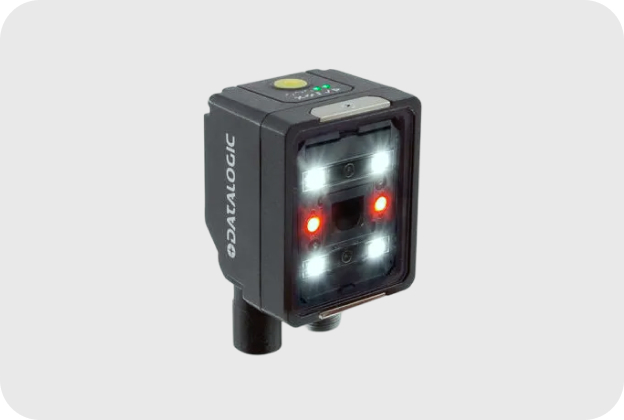
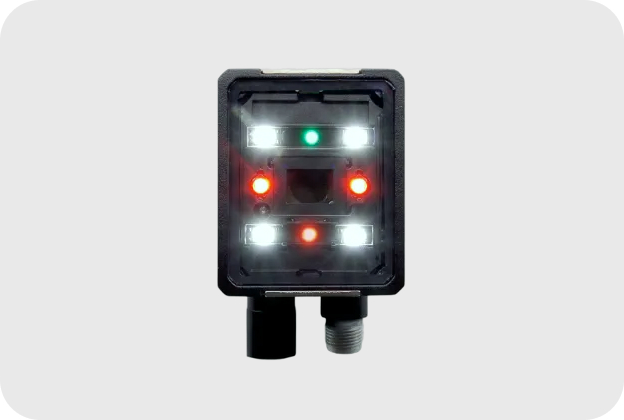
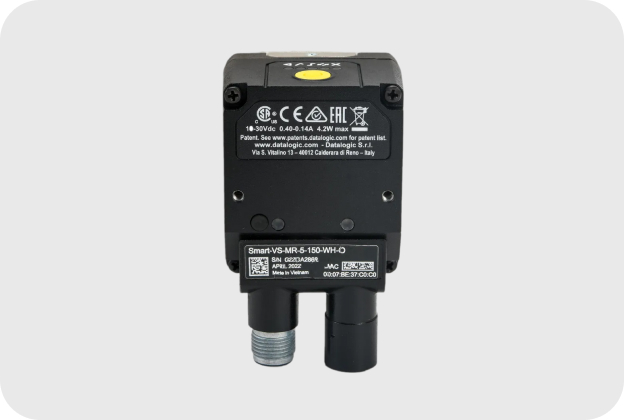
Smart-VS suits inspections where a visible difference identifies an acceptable or unacceptable condition, such as missing caps, absent labels or reversed components. Choose it when the decision requires an image of the product. For straightforward object detection at a fixed point, an appropriate S8 compact photoelectric sensor may be sufficient. Visual cap inspection does not establish tightening torque or seal integrity.
Standard suits simple GOOD/NO GOOD checks with up to six teaching images. PLUS expands teaching capacity to 20 images, allowing more examples of production variation. EVO supports up to six classification classes, anomaly detection and up to 50 teaching images. Choose around the inspection decision and representative sample set; additional teaching capacity alone does not establish better detection of a particular defect.
Use classification when you can define and teach distinct appearance categories, such as correctly assembled, reversed and missing components. Anomaly detection learns acceptable appearance and flags visual deviations, making it useful when faulty conditions are difficult to catalogue. Include normal production variation in the acceptable examples, then test separate good and faulty samples to assess false rejects and missed defects.
Smart-VS uses example-based teaching rather than conventional vision-tool programming, and inspection runs inside the sensor. Push-button teaching supports initial setup, while the Ethernet-accessed WebApp provides configuration and job-management functions. A PC is therefore useful for setup and troubleshooting without being the inspection processor. Teach and validate the application with the mounting position, lighting and product presentation intended for production.
Working distance is the sensor-to-object separation; field of view is the area visible in the image. Standard Smart-VS operates at 50–150 mm, while EVO extends to 400 mm, with an approximately 140 × 100 mm field of view at that distance. Select a position that includes the inspection feature and expected positional variation while retaining enough image detail to distinguish the smallest unacceptable condition.
Suitability depends on the configured inspection and time between products. EVO classification has a specified deterministic response of 15–50 ms, meaning timing is defined for the configured job; anomaly detection has variable timing up to 200 ms. These figures are not complete machine-cycle times. Check exposure, trigger spacing, output duration, controller processing and reject-actuator delay at the required production speed.
These materials can be suitable when the relevant feature remains distinguishable in the image. Integrated polarised white illumination helps reduce reflections, but mounting angle, background and ambient light still affect the result. For transparent containers, define whether the task concerns the container itself, its closure or its label. Evaluate representative materials and finishes, including acceptable variations that could otherwise resemble defects.
Smart-VS is intended for learned appearance checks, such as identifying whether a label or expected printed area is present. That result does not establish the printed value, barcode contents or a numerical dimension. For text recognition, barcode decoding or dimensional inspection, consider the Datasensing P3x machine vision smart camera, specifying the required inspection tools, optics and any additional software licences.
Smart-VS provides configurable NPN, PNP or push-pull digital outputs for conveying inspection results to compatible controller inputs. The PLC must associate each result with the correct product and control rejection after its travel to the reject station. Confirm trigger wiring, result-valid handling and output settings. Ethernet provides WebApp access; any required network-control functions or industrial protocols should be confirmed for the selected model and firmware.
Reuse requires checking the complete sensor and accessory part numbers. The documented Standard and PLUS configurations use a 17-pin M12 power/I/O connection, whereas the documented EVO configuration uses an 8-pin connection, so the existing power/I/O cable cannot be assumed compatible. Review pin assignments, PLC wiring, mounting, working distance and job-transfer requirements before ordering a replacement.
The published operating temperature range is 0–50°C, and IP67 protection depends on correctly fitted, fully tightened sealed cables. That rating alone does not establish suitability for hot washdown or chemical cleaning. Specify a compatible 10–30 V DC supply, power/I/O cable, Ethernet cable and mounting hardware. Use a metal mounting bracket for heat dissipation in high-temperature applications, as directed by the manufacturer.
Provide representative acceptable and faulty samples or images, the smallest condition to reject, inspection area, working distance and product spacing or cycle time. Include lighting, environmental conditions, PLC details, reject requirements and any existing sensor part number. Request an itemised configuration covering the sensor and installation accessories, with any application assessment, commissioning or support agreed through Marveltech’s industrial automation services.
The Datalogic SRX3 Ultrasonic Fork Sensor detects transparent, opaque and metallic-ink labels in packaging, labelling and print-and-apply machinery, including clear labels on clear backing. Its ultrasonic sensing method distinguishes labels from their backing without relying on optical contrast and supports single- and double-film detection after application-specific setup.
See DetailsThe Datalogic SRF Fork Sensor is a photoelectric fork sensor for small-part detection, edge positioning and object counting in packaging machinery, automotive assembly and automated production lines. Four fork widths, from 30 to 120 mm, and separate LED and laser models allow selection according to the available clearance, target size and switching-speed requirement.
See DetailsThe Datalogic SR23 Fork Sensor is a photoelectric label sensor for label-edge and gap detection in labelling machines, packaging lines and print-and-apply systems. Its 5 mm fork slot accommodates booklet and multilayer label formats, while a switching frequency of up to 12 kHz supports fast label-feed control.
See DetailsPlease contact us if you have any questions or comments.


